
Views: 0 Author: Site Editor Publish Time: 2026-10-01 Origin: Site


Losing or breaking your remote control right in the middle of a sweltering summer is a uniquely frustrating experience. Picture this scenario. You are comfortably settled in bed, and the room is growing uncomfortably warm. You reach for the controller only to find it missing or completely dead. Suddenly, you are forced to disrupt your rest just to adjust the airflow. If you find yourself in this situation, you are likely ready to buy a replacement. However, you might feel overwhelmed by the technical options.
Do you need an exact match for your unit? Will a generic alternative actually work? Or is it time to bypass the hassle entirely and upgrade to a brand new tower fan with remote control? This comprehensive buying guide walks you through everything required to find the perfect replacement. We will look at how to ensure seamless compatibility, troubleshoot connection issues, and get your cool breeze flowing again with just the push of a button.
Key Takeaways
Identify the Transmission Protocol: Knowing whether your appliance uses Infrared (IR) or Radio Frequency (RF) is the absolute first step before purchasing a replacement.
OEM vs. Universal: Original Equipment Manufacturer (OEM) remotes guarantee 100% feature mapping. Universal models offer a cost-effective, multi-device solution but require manual code syncing.
Verify the Model Number: Always locate the exact alphanumeric model number on the back or bottom of your unit. Guessing based on appearance often leads to mismatched frequencies.
Assess the Motor Lifespan: Sometimes, the cost of replacing an old controller justifies upgrading to a modern appliance with improved energy efficiency and better airflow dynamics.
Smart Integrations: Modern replacements now offer smartphone application integration via Wi-Fi or Bluetooth, completely transforming how you interact with your home climate control.
When a cooling appliance suddenly stops responding to external commands, the immediate reaction is to purchase a direct replacement. Taking a moment to understand exactly why your current controller failed will help you make a much more informed purchasing decision. Remote controls are subjected to significant daily wear and tear.
Beyond simply misplacing the device, the most common reason for hardware failure is battery terminal corrosion. When alkaline batteries sit inside a device for extended periods without use, they leak potassium hydroxide. This highly corrosive chemical degrades the copper contacts on the printed circuit board (PCB), breaking the electrical circuit entirely. Physical damage is another primary culprit. Dropping a remote onto a hard floor can cause micro-fractures in the internal board or dislodge the infrared emitting diode. Identifying these specific failure points helps determine whether the unit can be salvaged with a simple isopropyl alcohol cleaning or if a complete replacement is structurally necessary.
To select a proper replacement, you must understand the anatomical layout of your original device. A standard remote utilizes a microcontroller unit that translates your physical button presses into specific binary codes. These codes are then transmitted to the fan's receiver board. It is imperative that your replacement supports the specific features your machine possesses. For instance, buying a universal remote with a built-in ionizer button will not magically add that feature to a basic fan. The replacement must align flawlessly with the fan's existing internal programming.
Consumers generally face three distinct pathways when replacing a lost or broken controller: sourcing an OEM part, purchasing a universal alternative, or migrating to a smart home integration system. Each option presents specific advantages and empirical limitations.
OEM remotes are manufactured by the exact same company that built your fan. They are designed to be a perfect replica of the device you originally unboxed. The primary advantage here is plug-and-play reliability. There is no complex programming or code-searching required. You simply insert fresh batteries and resume operation. Conversely, these units are typically more expensive due to lower production volumes for replacement parts. If your appliance is more than a few years old, the manufacturer may have discontinued the specific part entirely.
In contrast, universal remotes are third-party devices programmed with a massive library of codes covering hundreds of different appliance brands. They are highly affordable and readily available. A significant advantage is their ability to consolidate clutter. A single high-end universal remote might operate your fan, television, and air conditioner simultaneously. However, they require manual pairing. You will need to spend time cycling through code libraries until you find the one that matches your receiver. Furthermore, universal models often focus on basic functions and may struggle to support advanced, unit-specific features.
Remote Type | Compatibility | Setup Effort | Best Use Case |
|---|---|---|---|
OEM (Original) | 100% Exact Match | None (Plug & Play) | Fans with unique features (e.g., custom sleep modes). |
Universal | Broad (Covers basic functions) | Moderate (Code searching) | Older fans, or consolidating multiple device remotes. |
Smart IR Hub | Any IR-based fan | High (App/Network setup) | Users wanting voice control and automated scheduling. |
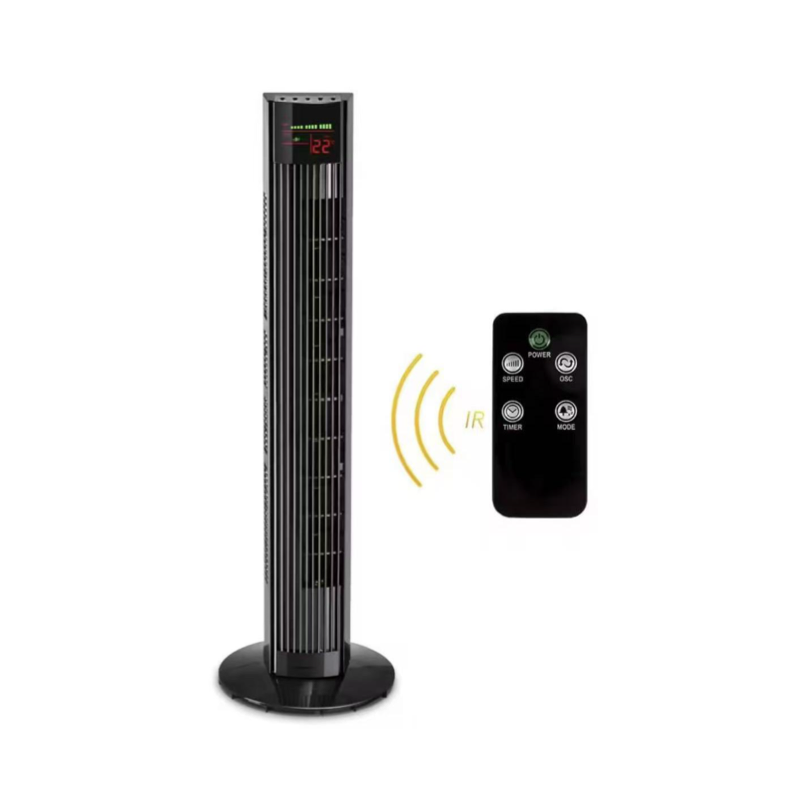
Purchasing a replacement without verifying technical compatibility is a frequent consumer error. The communication protocol between the handset and the fan is highly specific. Mismatched technologies will result in a complete failure to pair, leaving you right back where you started.
The foundational step in your buying journey is identifying the exact model number of your appliance. Relying solely on the brand name is insufficient, as manufacturers frequently change internal components across different product generations. You can typically find this alphanumeric code printed on a UL (Underwriters Laboratories) safety sticker. Check the rear panel of the fan housing, near the power cord exit point, or underneath the base plate. Inputting this exact model number into parts databases ensures you retrieve the correct frequency protocol.
Understanding the transmission medium is absolutely non-negotiable. The vast majority of household fans use IR technology, which operates using pulses of invisible light. Because it relies on light, IR requires a strict line of sight. If a blanket blocks the path between the remote and the fan's sensor, the signal will fail. Higher-end models utilize RF technology, which can penetrate solid objects, allowing you to control the unit from another room. You must buy the matching technology. An RF remote will never communicate with an IR receiver. A simple practical trick to test if your old, slightly broken remote is IR is to point your smartphone camera at the top of the remote while pressing a button. Smartphone sensors detect IR light, displaying it as a faint purple flash on your screen.
If you have decided to purchase an aftermarket replacement, evaluating the functional attributes of the device will ensure long-term satisfaction. Not all aftermarket controllers are manufactured to the same quality standards. At a bare minimum, the replacement must reliably cover the basic operational triad: power toggling, multi-speed airflow control, and timer configuration.
Specifically, directional control is critical. If you own an oscillating tower fan with remote that features a 90-degree wide sweep, you must ensure the aftermarket replacement has a dedicated, functional oscillation button. Generic remotes sometimes map the oscillation function to obscure buttons, which causes frustration during daily use. Furthermore, if your original unit featured a 12-hour programmable timer or 3 distinct speed settings (Normal, Natural, Sleep), the replacement controller's IC chip must be programmed to transmit those exact operational codes.
The physical construction of the remote dictates its longevity. Look for devices constructed from high-impact ABS plastic, which withstands accidental drops far better than brittle alternatives. Ergonomic features significantly enhance the user experience. Backlit buttons are highly recommended for bedroom use, allowing for easy adjustments in the dark without turning on room lights.
Once your new controller arrives, the pairing process dictates how quickly you can restore comfort to your living space. The methodology differs based on whether you purchased an OEM or universal model.
Universal devices require manual synchronization. Grab a fresh pair of high-quality alkaline batteries and install them properly. Ensure the fan is plugged into an active wall outlet but powered off. Press and hold the "Setup" button on the remote until the LED indicator light remains solidly illuminated. Next, consult the manual provided with the remote, locate your brand in the index, and enter the corresponding numeric code using the keypad. The LED light should turn off, indicating the code is saved. Press the Power button while aiming at the fan to test the connection.
In most instances, an IR-based OEM remote requires absolutely no programming. The hardcoded frequency matches the receiver board by default. However, if your fan uses RF technology, the remote and the fan must undergo a digital handshake. Typically, this involves unplugging the fan from the wall, plugging it back in, and holding the Power button on the remote within 30 seconds of restoring power. The fan will emit a confirmation beep once the RF frequencies synchronize.
If the fan remains unresponsive, perform a hard reset to clear the volatile memory on the printed circuit board. Unplug the tower fan from the wall outlet completely. Wait for a minimum of five minutes to allow the internal capacitors on the power board to fully discharge. While unplugged, press and hold the physical power button on the fan for 15 seconds to force any residual charge out. Plug the unit back in and attempt the pairing process again.
Looking at current engineering trends, the home appliance sector is experiencing a massive migration away from traditional infrared controllers. Market analysts report a surging consumer preference for Internet of Things (IoT) ecosystems. Rather than relying on easily lost plastic handsets, modern households are adopting smart IR blasters and Wi-Fi-enabled plugs.
This industry shift provides the convenience of controlling your fan from anywhere in the world. It also enables voice commands via smart speakers and automated temperature-based scheduling. As smart home integration becomes the baseline standard, traditional replacement remotes are slowly transitioning into legacy technology. If you are tired of replacing physical remotes, investing in a smart hub that clones IR signals into your smartphone is a highly practical, future-proof solution.
There comes a point in the lifecycle of every home appliance where repairing or replacing parts is no longer the most logical financial decision. Before spending money on a replacement controller, evaluate the overall mechanical condition of your current cooling unit.
Consider the age and mechanical health of your machine. If a high-quality OEM replacement remote costs $30, and your fan is a decade old, rattles loudly due to worn motor bearings, and consumes excessive electricity, investing in a peripheral device yields a poor return on investment. The average lifespan of a standard AC motor is approximately five to seven years of heavy use. If your unit is nearing the end of its mechanical lifecycle, allocating those funds toward a new appliance is highly recommended.
Advancements in fluid dynamics and motor efficiency have drastically improved modern cooling appliances. Upgrading to a remote controlled bladeless tower fan offers significant empirical benefits. These aerodynamic designs utilize air multiplier technology to draw in surrounding air and amplify it, resulting in a smoother, less turbulent airflow. The absence of fast-spinning external blades makes them inherently safer, and the lack of a traditional grille makes routine cleaning virtually effortless.
If you prefer the robust airflow of a traditional design, upgrading to a modern 36-inch tower fan with remote provides features that older models simply lack. Contemporary models frequently feature wider rotation angles and built-in smart thermostats. Instead of manually adjusting the speed as the room cools down, the fan automatically modulates its DC motor speed to maintain your exact target temperature, optimizing comfort while drastically reducing electrical waste.
Finding the right replacement for your lost or broken controller does not have to be a stressful endeavor. By checking your fan's specific model number and understanding your transmission technology, you can easily choose between a guaranteed OEM replacement or a versatile universal option. Keep in mind that aging appliances cost more to maintain in the long run. If your current fan is rattling or losing power, investing in a brand new, energy-efficient unit ensures long-term comfort. Evaluate your current cooling setup today, make the smart choice, and get back to enjoying a perfectly chilled room. For a full range of high-performance cooling solutions and replacement options, explore the advanced models available at FSWinsight to find the perfect fit for your home.
Yes, it is entirely possible depending on your hardware setup. If your fan uses an Infrared (IR) receiver and your smartphone is equipped with a built-in IR blaster, you can download a universal remote application to control the fan directly. If your phone lacks this hardware, you can purchase a standalone smart IR hub. This small device connects to your home Wi-Fi network and sends IR signals to your fan, allowing you to control it via an app.
No, universal remotes vary significantly in quality and capability. The primary difference lies in their internal code libraries. A budget-friendly universal remote may only contain codes for major appliance brands, while a premium model carries thousands of codes for obscure or older models. Basic remotes might only support power and speed functions, whereas advanced models handle complex features like oscillation and sleep modes.
Recall how your original remote functioned. If you had to point the remote directly at the front display of the fan for it to register your command, your fan uses Infrared (IR) technology. Conversely, if you were able to turn the fan on from another room, through a closed door, or while pointing the remote at the ceiling, your fan utilizes Radio Frequency (RF) technology.
This decision depends on the age and physical condition of your current appliance. If your fan is under three years old, runs quietly, and cools the room effectively, spending $15 to $30 on a replacement remote is the most logical choice. However, if your fan is over five years old, makes grinding noises, or struggles to push air efficiently, the internal motor bearings are likely failing. In that scenario, investing in a modern replacement is a better financial decision.
The model number is typically located on a manufacturer's specification sticker. Look at the back panel of the fan housing, near where the power cord exits the unit, or flip the fan over and check underneath the base plate. It is usually listed alongside the voltage and wattage requirements. Using this exact alphanumeric code is the only way to guarantee you purchase a compatible OEM remote.
Yes, provided all the fans utilize Infrared (IR) technology and you are within the line of sight for each specific fan when you press the button. Because IR relies on light beams, pressing the power button will only activate the fan currently in the same room. If you have multiple fans of the exact same brand and model, the single remote will operate all of them without needing to switch internal codes.

